Backboard now includes Adaptive Context Management, a system that automatically manages conversation state when your application moves between models with different context window sizes.
With access to 17,000+ LLMs on the platform, model switching is common. But context limits vary widely across models. What fits in one model may overflow another.
Context window management is now on by default for all new threads. Existing threads will inherit the setting on their next message.
Until now, developers had to handle that manually.
Adaptive Context Management removes that burden. And it’s included for free with Backboard.
The Problem: Context Windows Are Inconsistent
Different models support different context window sizes. Some allow large conversations. Others are much smaller.
If an application starts a session on a large-context model and later routes a request to a smaller one, the total state can exceed what the new model can handle.
That state typically includes more than just chat messages:
system prompts
recent conversation turns
tool calls and tool responses
RAG context
web search results
runtime metadata
When that information exceeds the model’s limit, something must be removed or compressed.
Most platforms leave this responsibility to developers. That means writing logic for truncation, prioritization, summarization, and overflow handling.
In multi-model systems, that quickly becomes fragile.
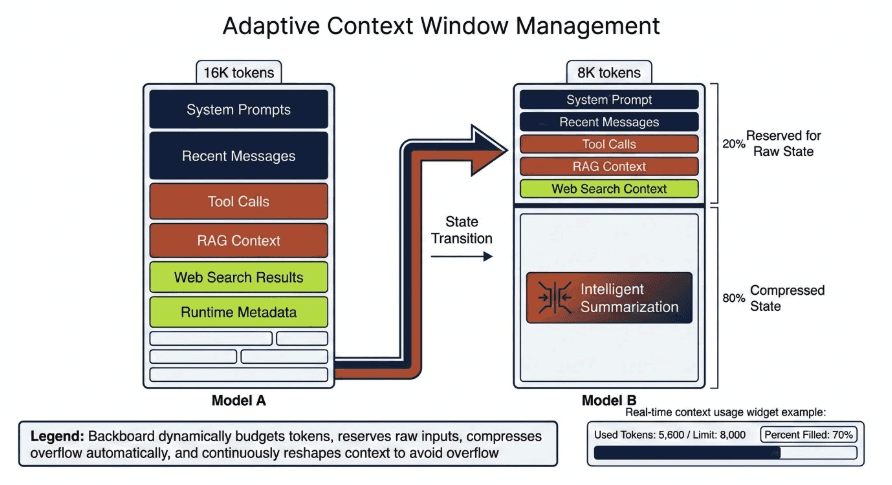
Introducing Adaptive Context Management
Backboard now automatically handles context transitions when models change.
When a request is routed to a new model, Backboard dynamically budgets the available context window.
The system works as follows:
20% of the model’s context window is reserved for raw state
80% is freed through intelligent summarization
Backboard first calculates how many tokens fit inside the 20% allocation. Within that space we prioritize the most important live inputs:
system prompt
recent messages
tool calls
RAG results
web search context
Whatever fits inside this budget is passed directly to the model.
Everything else is compressed.
Intelligent Summarization
When compression is required, Backboard summarizes the remaining conversation automatically.
The summarization pipeline follows a simple rule:
First we attempt summarization using the model the user is switching to.
If the summary still cannot fit within the available context, we fall back to the larger model previously in use to generate a more efficient summary.
This approach preserves the most important information while ensuring the final state fits inside the new model’s limits.
The process happens automatically inside the Backboard runtime.
You Should Rarely Hit 100% Context Again
Because Adaptive Context Management runs continuously during requests and tool calls, the system proactively reshapes the state before a context window is exhausted.
In practice this means your application should rarely reach the full limit of a model’s context window, even when switching models mid conversation.
Backboard keeps the system stable so developers do not need to constantly monitor token overflow.
Developers Can See Exactly What Is Happening
We also expose context usage directly in the msg endpoint so developers can track how their application is using context in real time.
Example response:
This makes it easy to monitor:
how much context is currently being used
how close a request is to the model’s limit
how many tokens were generated by summarization
which model is currently managing the context
Developers gain visibility without needing to build their own tracking systems.
The Bigger Idea
Backboard was designed so developers can treat models as interchangeable infrastructure.
But that only works if state moves safely with the user.
Adaptive Context Management is another step toward that goal. Applications can move freely across thousands of models while Backboard ensures the conversation state always fits the model being used.
Developers focus on building. Backboard handles the context.
Next Steps
Adaptive Context Management is available today through the Backboard API.
Start building at docs.backboard.io