Let OpenRouter Choose the Model
Don't want to choose a model manually for every request?
Set llm_provider to openrouter and model_name to openrouter/auto.
OpenRouter will classify the prompt and select the model for you. You pay the standard rate of the model it chooses, with no additional router fee.
{
"llm_provider": "openrouter",
"model_name": "openrouter/auto",
"openrouter": {
"cost_tier": "low"
}
}
You can also control which models OpenRouter is allowed to consider using:
allowed_modelsexcluded_modelscost_tier, ranging fromlowtomax
For example, allowed_models: ["anthropic/*"] limits automatic selection to Anthropic models.
The response tells you which model actually handled the request, so you retain visibility into what ran.
Choose Who Serves Your Model
Choosing the model is only part of the decision.
OpenRouter can serve the same model through multiple providers, each with its own pricing and infrastructure characteristics.
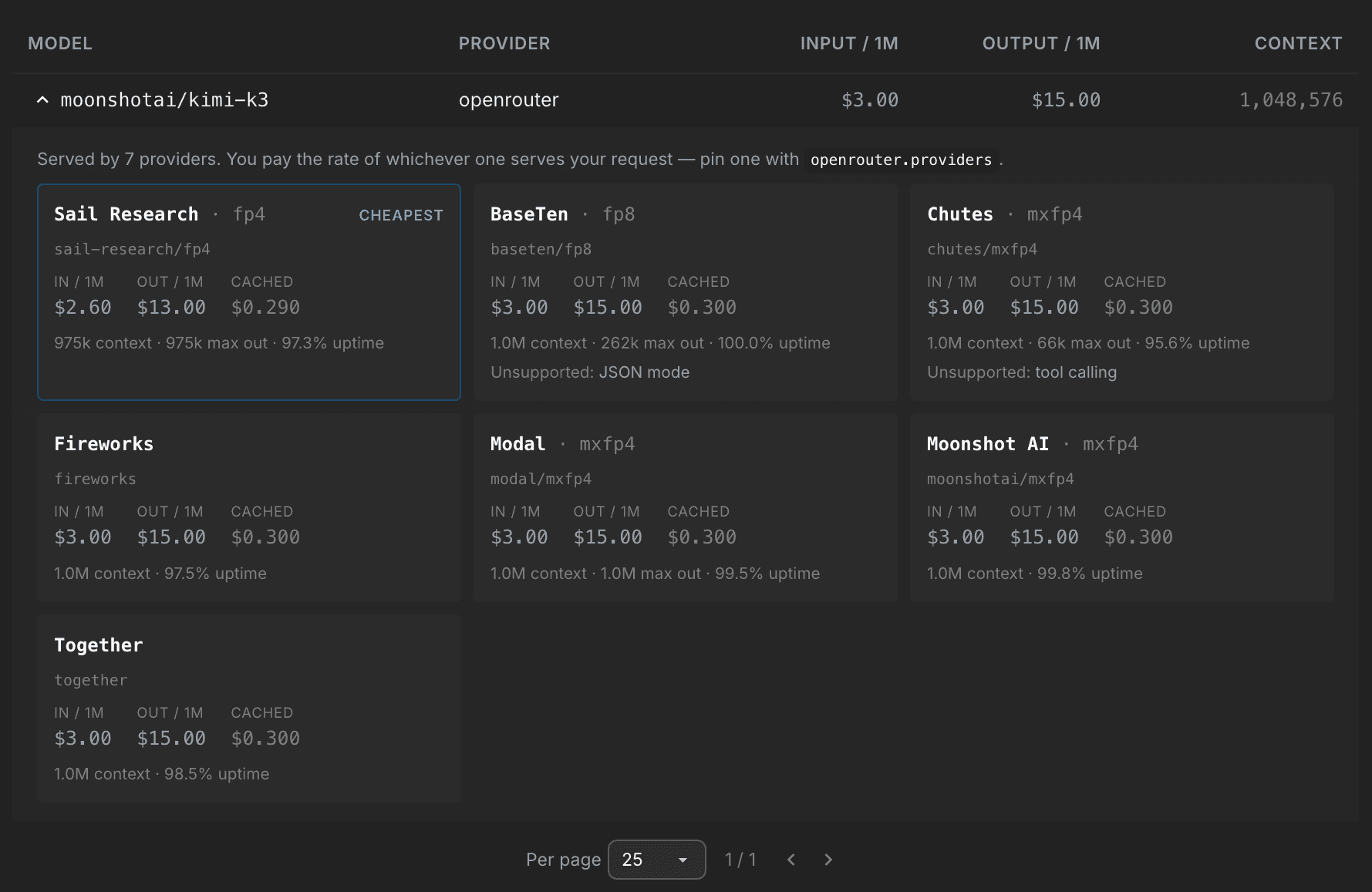
For example, moonshotai/kimi-k3 is available through multiple providers.
Backboard now lets you specify which provider should serve your request:
{
"llm_provider": "openrouter",
"model_name": "moonshotai/kimi-k3",
"openrouter": {
"providers": ["together"],
"allow_fallbacks": true
}
}
With allow_fallbacks enabled, the request can fall back when your selected provider is unavailable.
This gives you another level of control: choose the model you want, then choose who runs it.
Explore Providers in the Model Library
Want to see which providers are available for a particular OpenRouter model?
The Backboard Model Library now surfaces provider options alongside pricing, context limits, uptime, and other model information.
Explore the Model Library:
https://app.backboard.io/dashboard/model-library
Available Now
OpenRouter automatic model selection and provider selection are available now through:
Backboard API
Python SDK v1.5.16+
TypeScript SDK v1.5.16+
For implementation details and configuration options, see the full Messages documentation:
https://docs.backboard.io/concepts/messages
Choose the model. Choose who runs it. Backboard handles the rest.
Rob Imbeault
SHARE